
If you would like to verify what address your school has entered for your student's bus stop using the new Here Comes the Bus (HCTB) app, follow these steps:
Note: You CANNOT CHANGE the location of your student's bus stop via the app. If you need to do so, you must contact your student's school and follow their protocol for bus stop adjustments. A good place to begin is on your district's website.
Be aware, however, that your school may reserve the right to make or refuse changes to a student's bus stop as they see fit.

- On any HCTB screen with the main menu at the bottom, tap Students. (Tap Back if needed to return to such a page.)
The Students screen will appear and list all the students in your HCTB account.
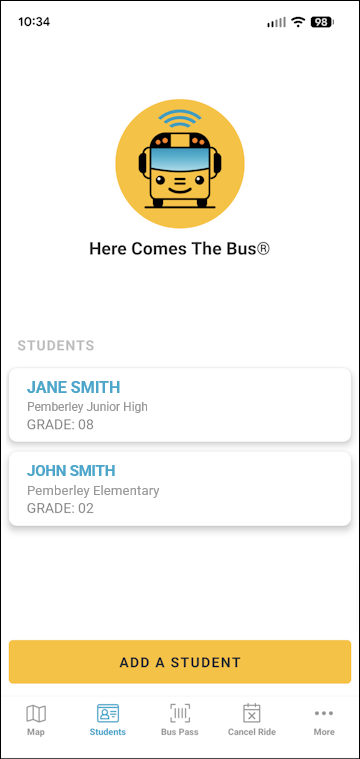
- Tap the name of the student whose bus stops you want to check.
Their student data will be displayed.
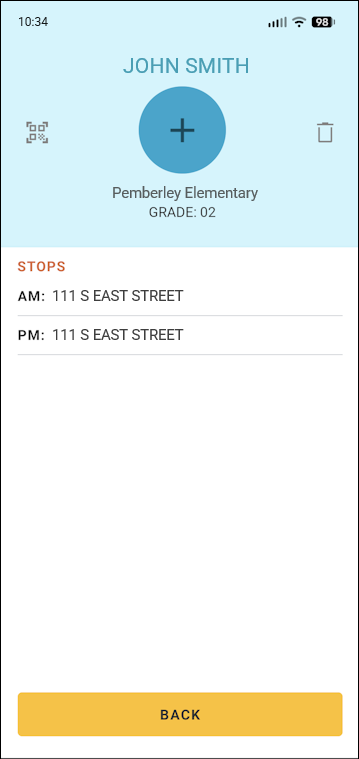
- You can see the address on file for each of the student's bus stops in the Stops section (AM for the morning stop, MID for a mid-day stop [if any], and PM for the afternoon stop).
- You can tap Back at the bottom to return to the Students screen.