You may have noticed receiving a notification telling you "There will be changes to the bus service schedule on 4/20/2026 due to XXX" and a label of "Calendar Exception" in the Here Comes the Bus (HCTB) app. If you have, and are wondering what a calendar exception is, this article is for you.
A calendar exception is a change in the normally scheduled school bus routes that indicates the buses will be operating at a different time than expected — for example, a morning delay pushing the AM pickup at your student's bus stop back two hours or an early dismissal bringing them home 90 minutes before the usual hour. Also, a calendar exception could be a bus route cancellation for the whole day, such as if your school district calls off all classes due to a snowstorm.
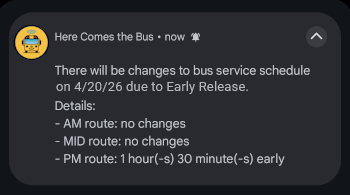
If you have opted in for alerts, the HCTB app will notify you by push notification and/or email on the day a calendar exception will affect your student's bus stop times. The notice will include the date of the bus route modification, the three times of day for bus operation (AM, MID, and PM), and how each part of the day will be changed. It will look similar to this:
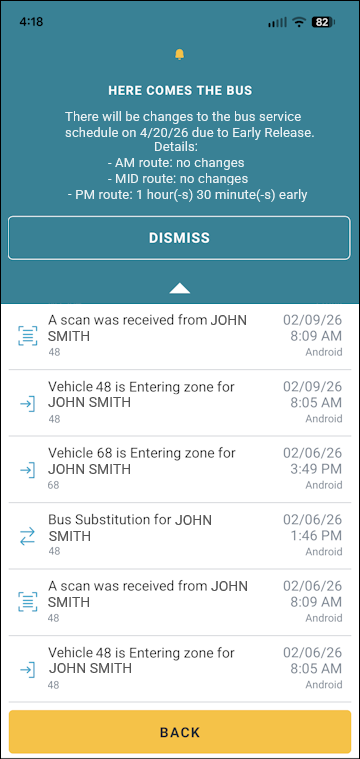
If you already had the HCTB app open, you will see a notification like the following:
Note: You may need to tap  at the top of the screen to open the message.
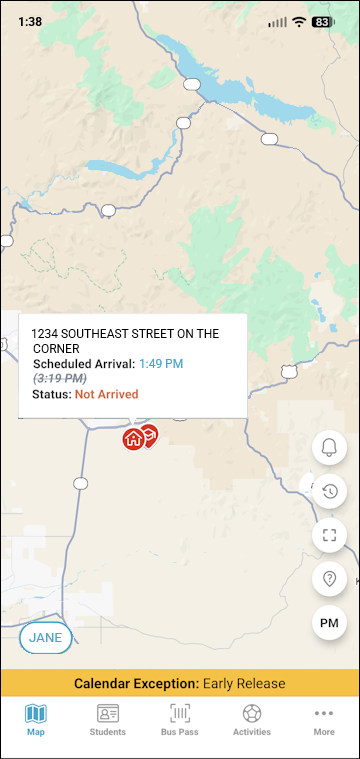
On the Map screen, you'll see a Calendar Exception bar along the bottom (above the main menu). If you tap your home bus stop, you'll see the adjusted time.
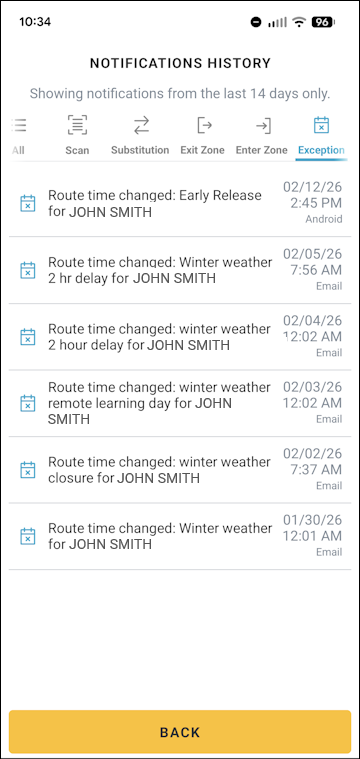
To see calendar exceptions in the Notifications History list, tap  on the right of the Map screen and select Exception in the toolbar at the top of the screen.